---
title: What is my Current State report?
description: How to find and use Opscompass Oracle licensing current state assessment
---
[Skip to content](https://kb.opscompass.com/knowledge/what-is-my-current-state-report#main-content)
[](https://opscompass.com)
- [Home](https://opscompass.com/)
- [Why Opscompass](https://opscompass.com/why-opscompass/)
- Product
Show submenu for Product
- [Inventory](https://opscompass.com/inventory/)
- [Configuration Drift](https://opscompass.com/product/configuration-drift/)
- [Compliance](https://opscompass.com/product/compliance/)
- [Licenses](https://opscompass.com/solutions/licenses/)
- Solutions
Show submenu for Solutions
- [Hybrid and Multi-Cloud Visibility](https://opscompass.com/solutions/multi-cloud-visibility/)
- [About Us](https://opscompass.com/company/)
Open main navigation
Close main navigation
- [Home](https://opscompass.com/)
- [Why Opscompass](https://opscompass.com/why-opscompass/)
- Product
Show submenu for Product
- [Inventory](https://opscompass.com/inventory/)
- [Configuration Drift](https://opscompass.com/product/configuration-drift/)
- [Compliance](https://opscompass.com/product/compliance/)
- [Licenses](https://opscompass.com/solutions/licenses/)
- Solutions
Show submenu for Solutions
- [Hybrid and Multi-Cloud Visibility](https://opscompass.com/solutions/multi-cloud-visibility/)
- [About Us](https://opscompass.com/company/)
- [Get a Demo](https://opscompass.com/demo/)
[Get a Demo](https://opscompass.com/demo/)
What are you looking for?
- There are no suggestions because the search field is empty.
1. [Help Center](https://kb.opscompass.com/knowledge)
2. [Licenses](https://kb.opscompass.com/knowledge/licenses)
# What is my Current State report?
## Current State is your most up-to-date licensing report in Opscompass
Your current state is updated regularly to show what your license usage compliance is.
For both Oracle and SQL Server Licensing, you can access your current state on the license dashboard by clicking on the button in the top left card.
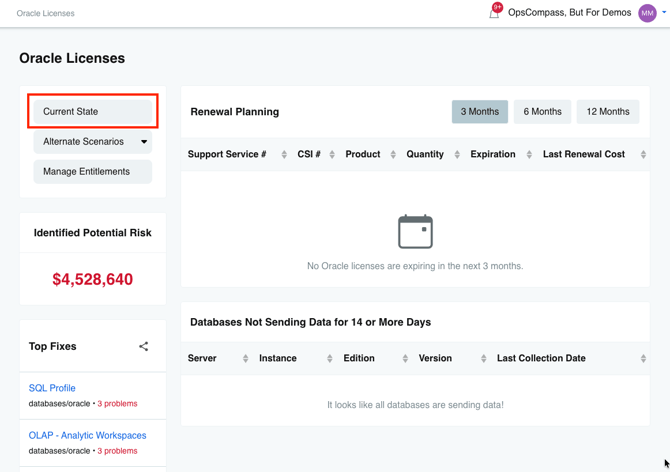
Once you click on the "Current State" button, the next page will load. This page has four tabs:
- **Compliance** - Displays the products you are using, how much you are using, and the potential financial risk
- **Entitlements** -A comprehensive list of your entitlements, including order details and quantity
- **License Usage Map** - Outlines where each product is deployed and the number in use
- **Deployment Details** - Offers a detailed, server-level breakdown of product deployments
Learn more about uploading your [Oracle](https://kb.opscompass.com/knowledge/manage-oracle-entitlements) or [SQL](https://kb.opscompass.com/knowledge/manage-sql-server-entitlements) entitlements to get started!
- [About Opscompass](https://kb.opscompass.com/knowledge/about-opscompass#main-content)
- [Company Information](https://kb.opscompass.com/knowledge/about-opscompass#company-information)
- [Getting Started](https://kb.opscompass.com/knowledge/getting-started#main-content)
- [Logging In](https://kb.opscompass.com/knowledge/getting-started#logging-in)
- [Connecting Cloud Accounts](https://kb.opscompass.com/knowledge/getting-started#connecting-cloud-accounts)
- [Users and Teams](https://kb.opscompass.com/knowledge/getting-started#users-and-teams)
- [Opscompass CLI](https://kb.opscompass.com/knowledge/opscompass-cli#main-content)
- [Getting Started](https://kb.opscompass.com/knowledge/opscompass-cli#getting-started)
- [Resources](https://kb.opscompass.com/knowledge/opscompass-cli#resources)
- [Accounts](https://kb.opscompass.com/knowledge/opscompass-cli#accounts)
- [Compliance](https://kb.opscompass.com/knowledge/opscompass-cli#compliance)
- [Licensing](https://kb.opscompass.com/knowledge/opscompass-cli#licensing)
- [Examples](https://kb.opscompass.com/knowledge/opscompass-cli#examples)
- [AI Skills](https://kb.opscompass.com/knowledge/opscompass-cli#ai-skills)
- [Opscompass FAQs](https://kb.opscompass.com/knowledge/opscompass-faqs#main-content)
- [General](https://kb.opscompass.com/knowledge/opscompass-faqs#general)
- [New Features](https://kb.opscompass.com/knowledge/new-features)
- [Account Management](https://kb.opscompass.com/knowledge/account-management)
- [Compliance](https://kb.opscompass.com/knowledge/compliance)
- [Documents](https://kb.opscompass.com/knowledge/documents)
- [Drift](https://kb.opscompass.com/knowledge/drift)
- [Inventory](https://kb.opscompass.com/knowledge/inventory)
- [Licenses](https://kb.opscompass.com/knowledge/licenses#main-content)
- [Oracle](https://kb.opscompass.com/knowledge/licenses#oracle)
- [SQL Server](https://kb.opscompass.com/knowledge/licenses#sql-server)
- [Navigation and Dashboard](https://kb.opscompass.com/knowledge/navigation-and-dashboard)
- [Opscompass Integrations](https://kb.opscompass.com/knowledge/opscompass-integrations)
- [Tutorials](https://kb.opscompass.com/knowledge/tutorials#main-content)
- [CLI](https://kb.opscompass.com/knowledge/tutorials#cli)
[](http://opscompass.com)
Copyright © 2025, Opscompass