
The Oracle Feature Usage page provides continuous visibility into Oracle options and management packs that have been detected as active. This replaces manual feature usage scripts and gives you an always‑current view aligned with how Oracle audits typically assess usage.
Getting Started
You can find Oracle Feature Usage in the left‑hand navigation under Licenses.
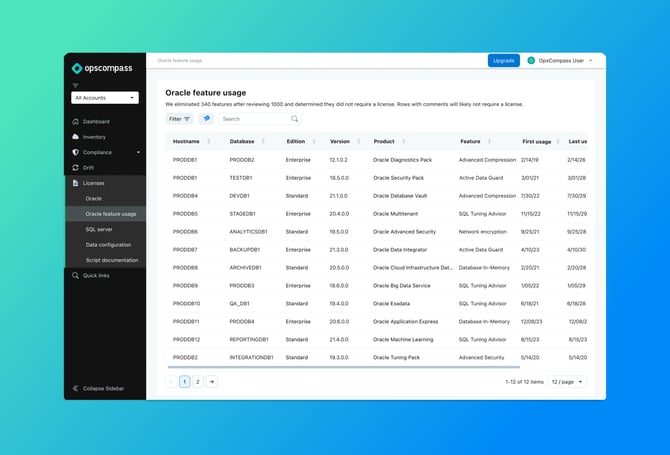
This page displays detected Oracle feature usage across all collected databases, including when each feature was first and last used.
What You’ll See on the Oracle Feature Usage Page
The Oracle Feature Usage page presents a table where each row represents a detected instance of Oracle feature usage on a specific database.
The table includes the following columns:
- Hostname
The server where the database is running.
- Database
The database where feature activity was detected.
- Edition
The Oracle database edition (for example, Enterprise or Standard).
- Version
The Oracle database software version.
- Product
The Oracle option or management pack associated with the feature.
- Feature
The specific feature activity detected by Oracle.
- First usage
The earliest date Oracle recorded activity for the feature.
- Last usage
The most recent activity date recorded for the feature.
Feature Review and Elimination
Oracle reports a large number of feature signals, many of which do not require a license. Opscompass reviews and filters these signals before presenting them in this view.
Comments in the Table
Rows that include comments are typically included for transparency and context. These rows often indicate feature activity that could represent a license obligation but can likely be excluded based on the indicated factor(s). Regardless, they may still be useful for understanding the overall environment and audit defensibility.
Filtering and Search
The Oracle Feature Usage table supports:
- Free‑text search across hosts, databases, products, and features
- Sorting by column
- Filters to narrow results by environment or usage pattern
These controls make it easier to focus on specific databases or investigate particular features.
What Oracle Feature Usage Tells You (and What It Doesn’t)
Oracle Feature Usage answers:
- Which Oracle features have been detected as used
- Where those features were used
- When the usage first and most recently occurred
Oracle Feature Usage does not:
- Validate license entitlements
- Calculate audit or financial risk
- Provide remediation guidance
Common Use Cases
Customers can use Oracle Feature Usage to:
- Replace manual feature usage scripts
- Detect unintended feature activation
- Support internal licensing and compliance reviews
- Prepare for Oracle audit discussions with validated internal data
- Share usage findings with procurement or asset management teams