---
title: A brief introduction to the Opscompass CLI with examples
description: The Opscompass Command Line Interface (CLI) can be a powerful tool to use for automating tasks and extracting data from Opscompass.
---
[Skip to content](https://kb.opscompass.com/knowledge/a-brief-introduction-to-the-opscompass-cli-with-examples#main-content)
[](https://opscompass.com)
- [Home](https://opscompass.com/)
- [Why Opscompass](https://opscompass.com/why-opscompass/)
- Product
Show submenu for Product
- [Inventory](https://opscompass.com/inventory/)
- [Configuration Drift](https://opscompass.com/product/configuration-drift/)
- [Compliance](https://opscompass.com/product/compliance/)
- [Licenses](https://opscompass.com/solutions/licenses/)
- Solutions
Show submenu for Solutions
- [Hybrid and Multi-Cloud Visibility](https://opscompass.com/solutions/multi-cloud-visibility/)
- [About Us](https://opscompass.com/company/)
Open main navigation
Close main navigation
- [Home](https://opscompass.com/)
- [Why Opscompass](https://opscompass.com/why-opscompass/)
- Product
Show submenu for Product
- [Inventory](https://opscompass.com/inventory/)
- [Configuration Drift](https://opscompass.com/product/configuration-drift/)
- [Compliance](https://opscompass.com/product/compliance/)
- [Licenses](https://opscompass.com/solutions/licenses/)
- Solutions
Show submenu for Solutions
- [Hybrid and Multi-Cloud Visibility](https://opscompass.com/solutions/multi-cloud-visibility/)
- [About Us](https://opscompass.com/company/)
- [Get a Demo](https://opscompass.com/demo/)
[Get a Demo](https://opscompass.com/demo/)
What are you looking for?
- There are no suggestions because the search field is empty.
1. [Help Center](https://kb.opscompass.com/knowledge)
2. [Opscompass CLI](https://kb.opscompass.com/knowledge/opscompass-cli)
3. [Examples](https://kb.opscompass.com/knowledge/opscompass-cli#examples)
# A brief introduction to the Opscompass CLI with examples
## The Opscompass Command Line Interface (CLI) can be a powerful tool to use for automating tasks and extracting data from Opscompass. Below are some examples to help you get familiar with the CLI.
This KB article assumes you have already installed the Opscompass CLI and logged in as shown in this Knowledge Base article: [https://kb.opscompass.com/knowledge/opscompass-command-line-interface](https://kb.opscompass.com/knowledge/opscompass-command-line-interface)
The first thing you will want to get is your company name to be used with subsequent commands:
`opscompass accounts list-companies`
Output:
```
[ { "name": "Acme Inc", "company": "acmeinc" }]
```
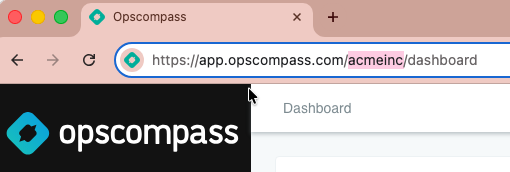
The output shows you full company name and also what is referred to as the the “Company ID”or “slug” in some commands. Here the “Company ID is “acmeinc”. The “Compnay ID” is also seen in the URL when you are signed into the Opscompass web interface:
### **
Most customers will have only one company listed, unless you have subsidiaries that are running Opscompass separately, then you may have access to more than one company.
Now you can list the Cloud accounts that are connected to your Company account:
`opscompass accounts list-accounts --company acmeinc`
Sample output:
```
[ { "name": "Acme Inc", "id": 11294, "cloudId": "Ht70sAbc23fdWAcUxIk0", "cloudProvider": "mlss", "removedFromCloudAt": null }, { "name": "acmeinc.onmicrosoft.com", "id": 11247, "cloudId": "2bef17fb-8b6e-4b32-862c-c36e77a7592c", "cloudProvider": "microsoft365", "removedFromCloudAt": null }, { "name": "acmeinc-sub-compartment-1", "id": 12054, "cloudId": "ocid1.compartment.oc1..aaaaaaaa23jk2kj389202kj3jjk2kj3j2koou322", "cloudProvider": "oci", "removedFromCloudAt": null }]
```
We can see that Acme Inc has one Microsoft 365 account, one Oracle Cloud Infrastructure (OCI) account, and a MLSS account, which is an Opscompass license monitoring account.
### **Examples**
The general syntax of a CLI command is:
`opscompass module action --parameter1 value --parameter2 value`
Below we give several more examples of CLI commands for various modules. Most of these generate output to lengthy to be included here, but they will give you a quick introduction to some useful commands. We use the Company ID/slug “acmeinc” in all the examples. Substitute your own Company ID.
#### **Defaults**
The “defaults” module lets you store some common defaults so you don’t have to type them for every command.
To see your current defaults:
`opscompass defaults list-defaults`
Your defaults are all set to “none” to start with. To set your default company ID so you don’t have to put it on other commands, use your Company ID with “set-defaults”:
`opscompass defaults set-defaults --company acmeinc`
Now, for example, I can type “opscompass accounts list-accounts” without the “--company” parameter
For more information, see our “Defaults” KB article: [https://kb.opscompass.com/knowledge/cli/defaults](https://kb.opscompass.com/knowledge/cli/defaults)
#### **Resources**
The “resources” module allows you to list resources or retrieve information about specific resources.
To list all AWS EC2 Instances across all Cloud Accounts:
`opscompass resources list --company acmeinc --resource-types AWS::EC2::Instance`
To list all Azure SQL databases across all Cloud Accounts
`opscompass resources list --company acmeinc --resource-types Microsoft.Sql/servers`
To add a tag to a specific resource by ID:
`opscompass resources add-tags --company acmeinc --id 12345 --tag "example-tag"`
See our KB article about tagging multiple resources: [https://kb.opscompass.com/knowledge/tagging-multiple-resources](https://kb.opscompass.com/knowledge/tagging-multiple-resources)
To get information about a specific resource by ID:
`opscompass resources get --company acmeinc --id 1234567`
See our KB article showing how to find the ID for a resource: [https://kb.opscompass.com/knowledge/cli/resource-company-id](https://kb.opscompass.com/knowledge/cli/resource-company-id)
See our Resources CLI KB Article for complete options and syntax: [https://kb.opscompass.com/knowledge/cli/resources](https://kb.opscompass.com/knowledge/cli/resources)
#### **Compliance**
The “compliance” module allows you to list data or retrieve information about specific compliance checks.
To lists all exceptions and mitigations that have been set across all of your accounts:
`opscompass compliance list-compliance-exceptions --company acmeinc`
To lists all email addresses that appear in one or more breaches from Have I Been Pwned:
`opscompass compliance list-breaches --company acmeinc`
To list all compliance checks that have been disabled for a company
`opscompass compliance list-disabled-checks --company acmeinc`
See our Compliance CLI KB Article for complete options and syntax: [https://kb.opscompass.com/knowledge/cli/compliance](https://kb.opscompass.com/knowledge/cli/compliance)
**License Manager**
The Licensing module is used to list information for Oracle and SQL Server license monitoring configurations.
The most common command you will use is to list all of the monitoring configurations associated with the given company:
`opscompass license-manager list-monitoring-configurations –company acmeinc`
Other commands are beyond the scope of this CLI introduction. Please see our License Manager KB article for complete options and syntax: [https://kb.opscompass.com/knowledge/cli/license-manager](https://kb.opscompass.com/knowledge/cli/license-manager)
- [About Opscompass](https://kb.opscompass.com/knowledge/about-opscompass#main-content)
- [Company Information](https://kb.opscompass.com/knowledge/about-opscompass#company-information)
- [Getting Started](https://kb.opscompass.com/knowledge/getting-started#main-content)
- [Logging In](https://kb.opscompass.com/knowledge/getting-started#logging-in)
- [Connecting Cloud Accounts](https://kb.opscompass.com/knowledge/getting-started#connecting-cloud-accounts)
- [Users and Teams](https://kb.opscompass.com/knowledge/getting-started#users-and-teams)
- [Opscompass CLI](https://kb.opscompass.com/knowledge/opscompass-cli#main-content)
- [Getting Started](https://kb.opscompass.com/knowledge/opscompass-cli#getting-started)
- [Resources](https://kb.opscompass.com/knowledge/opscompass-cli#resources)
- [Accounts](https://kb.opscompass.com/knowledge/opscompass-cli#accounts)
- [Compliance](https://kb.opscompass.com/knowledge/opscompass-cli#compliance)
- [Licensing](https://kb.opscompass.com/knowledge/opscompass-cli#licensing)
- [Examples](https://kb.opscompass.com/knowledge/opscompass-cli#examples)
- [AI Skills](https://kb.opscompass.com/knowledge/opscompass-cli#ai-skills)
- [Opscompass FAQs](https://kb.opscompass.com/knowledge/opscompass-faqs#main-content)
- [General](https://kb.opscompass.com/knowledge/opscompass-faqs#general)
- [New Features](https://kb.opscompass.com/knowledge/new-features)
- [Account Management](https://kb.opscompass.com/knowledge/account-management)
- [Compliance](https://kb.opscompass.com/knowledge/compliance)
- [Documents](https://kb.opscompass.com/knowledge/documents)
- [Drift](https://kb.opscompass.com/knowledge/drift)
- [Inventory](https://kb.opscompass.com/knowledge/inventory)
- [Licenses](https://kb.opscompass.com/knowledge/licenses#main-content)
- [Oracle](https://kb.opscompass.com/knowledge/licenses#oracle)
- [SQL Server](https://kb.opscompass.com/knowledge/licenses#sql-server)
- [Navigation and Dashboard](https://kb.opscompass.com/knowledge/navigation-and-dashboard)
- [Opscompass Integrations](https://kb.opscompass.com/knowledge/opscompass-integrations)
- [Tutorials](https://kb.opscompass.com/knowledge/tutorials#main-content)
- [CLI](https://kb.opscompass.com/knowledge/tutorials#cli)
[](http://opscompass.com)
Copyright © 2025, Opscompass